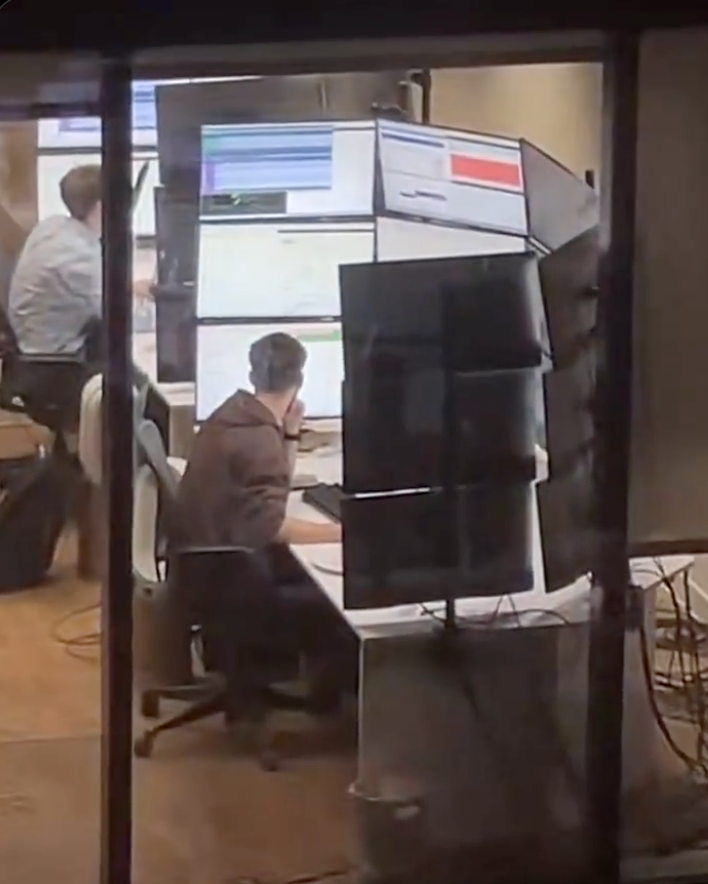
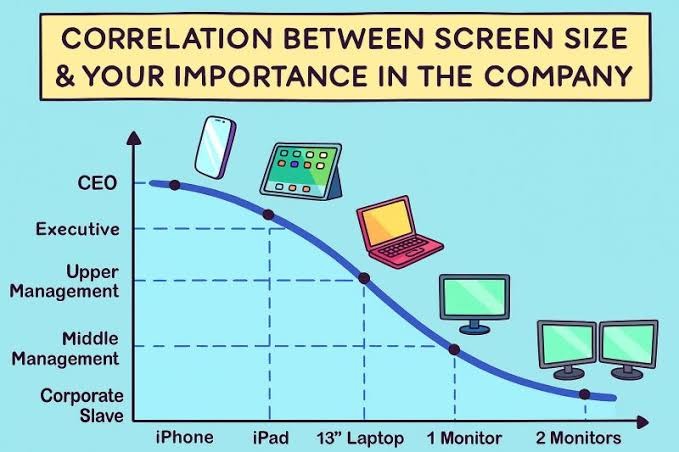
Image I guess we need to extend this chart somewhat…
WHERE THE FUCK IS THE CURSOR?
Submitted 6 months ago by Beep@lemmus.org to [deleted]
https://pbs.twimg.com/media/HCg1-MxWEAAVgPg.png
Comments
Overspark@piefed.social 6 months ago
multifariace@lemmy.world 6 months ago
The most important is at the bottom of that curve, right?
DickFiasco@sh.itjust.works 6 months ago
Well, yes, but also the lowest-paid.
bitjunkie@lemmy.world 6 months ago
zalgotext@sh.itjust.works 6 months ago
Yeah it starts ticking back up after 2 monitors
Overspark@piefed.social 6 months ago
It really doesn’t, and I day that as someone who often had 3 or 4 monitors on his desk 😂
DickFiasco@sh.itjust.works 6 months ago
Needs a log scale x-axis
ThePyroPython@lemmy.world 6 months ago
Yeah and the wild thing is that the importance axis is cut-off, by the time it reaches 10+ screens that’s the single most important employee who if they were runover by a bus tomorrow, the company will just randomly implode one day when something only they know how to maintain just falls over and no contractor can untangle the spaghetti infrastructure.
The thing is, they haven’t had a pay rise since screen 6 but somehow are just unphased even by inflation.
TransNeko@lemmy.world 6 months ago
nope. you just need to adjust a few things. 2 monitors for corporate serfs (rename middle management to serfs) and 4+ for corporate slaves. upper management gets a laptop and a normal monitor. executives can stay the same. CEO needs 2 phones.
VonReposti@feddit.dk 6 months ago
CEO needs 2 phones
Is the second one for the coke dealer?
Rooster326@programming.dev 6 months ago
I think the current dogma is CEO gets a phone with 2 screens.
Soon to be 3 with the Samsung (You can’t afford it anyways).
SkunkWorkz@lemmy.world 6 months ago
Okay I use a 50” TV as a monitor. What am I?
Simulation6@sopuli.xyz 6 months ago
Unemployed?
Overspark@piefed.social 6 months ago
redsand@infosec.pub 6 months ago
Those executive ultabook, touch screen super thin and lites are such shit. Fragile, usually run hot, sometimes the SSD is even soldered, and fuck you if you want to get parts or service.
W98BSoD@lemmy.dbzer0.com 6 months ago
GladiusB@lemmy.world 6 months ago
Too real
Sylvartas@lemmy.dbzer0.com 6 months ago
Wtf is this ? What the hell are they doing that requires 27 screens ?
betterdeadthanreddit@lemmy.world 6 months ago
Haquer@lemmy.today 6 months ago
“Halle Berry’s Breasts: The Movie” We need more of these
zod000@lemmy.dbzer0.com 6 months ago
Despite the moving itself sucking, that’s a rad looking setup. I mean, it would suck to use for actual work, but its cool as hell.
Zachariah@lemmy.world 6 months ago
What aren’t they doing?
AlligatorBlizzard@sh.itjust.works 6 months ago
IDK but I’ve seen pics of 911 operator setups with some absurd number of screens and I bet there’s a lot of stuff that would be useful for them to have open.
Sylvartas@lemmy.dbzer0.com 6 months ago
Makes sense yeah. I guess at this point it’s a monitoring station more than a computer, i.e the operator is not gonna have many interactions with it other than looking at the screens
KingPapaDaddy@lemmy.world 6 months ago
It’s 4. My daughter is an operator.
philpo@feddit.org 6 months ago
Yeah, but not that many.
Usual setup nowadays: One monitor for the main CAD (computer aided dispatch) forms, one for map overview, eventually a third one for a unit overview(theye are often done on the map monitor these days), one for external data (browser window, video feeds,etc.), one below as a touchscreen for communication control (VoIP/Radio).
Most EMS Dispatch clients I have switched to a three+one touch setup ages by now and rather use a central dashboard for some less important views and feeds.
Kraiden@piefed.social 6 months ago
I have a friend who works for Transpower (company in charge of NZ electric grid) and occasionally goes into their control rooms. Apparently they have set ups like this. It gets worse, because there are several computers hooked up to the different monitors, so not only do they have a wall of monitors, they have a bunch of different keyboards and mice (mouses?) that they have to hunt through if they want to actually interact with something
kryptonianCodeMonkey@lemmy.world 6 months ago
They need to invest in some KVM switches. Just leave the monitors connected directly to the towers but route the input devices through the switch. There’s no good reason for a single person to face more than one keyboard and mouse at the same desk.
humanspiral@lemmy.ca 6 months ago
There is crossplatform software for mouse/keyboard sharing.
VaalaVasaVarde@sopuli.xyz 6 months ago
It’s the boss screen, in a second they will Alt-Tab into Flight simulator.
CannedYeet@lemmy.world 6 months ago
Gooning
rumba@lemmy.zip 6 months ago
I’ve seen stock traders where everyone on the floor had half that many. A few of them had 9.
When they’re looking up trades or news, they open a ridiculous number of windows while doing research.
They have 4 screens just to watch the markets and handle in-house controls.
What’s striking about this is the amount of whitespace on the screens. They are only using 1/2 - 1/4 of their screen space.
Skunk@jlai.lu 6 months ago
I work in ATC and we have several desks with around 12 to 18 screens. Not in that layout tho, but on a much larger banana form.
They are used at different work positions, mostly for monitoring but also used with keyboard and mouse.
The applications goes from technical surveillance of ops systems, to flow capacity (airspace capacity), meteo broadcast for all airports (ATIS) or ground-ground telecommunications of aeronautical data.
lbfgs@programming.dev 6 months ago
Traders love doing this
skittle07crusher@sh.itjust.works 6 months ago
It’s a cropped version of a BBC office someone could see from their apartment
merc@sh.itjust.works 6 months ago
I remember that post, and that only makes it stranger. What is the BBC doing that requires that many monitors?
Phoenix3875@lemmy.world 6 months ago
Not sure about this one, but I know quant traders sometimes like many screens with many dashboards for realtime trading.
DioramaOfShit@lemmy.world 6 months ago
Russian space program
scottmeme@sh.itjust.works 6 months ago
IIRC when keemstar posted it, it’s a BBC office
raman_klogius@ani.social 6 months ago
The GPU having to render 60K pixels at 144fps: “I’m tired boss”
wizardbeard@lemmy.dbzer0.com 6 months ago
Almost certainly multiple in that sort of setup
Landless2029@lemmy.world 6 months ago
When you have that many monitors they’re literally just monitoring. 15 FPS is fine for that.
username_1@programming.dev 6 months ago
xeyes is a classic X Window program that helps finding the cursor (looks like a pair of eyes looking at the direction of the cursor)
Beep@lemmus.org 6 months ago
We don’t talk about Xorg in 2026.
username_1@programming.dev 6 months ago
Pfah, I dare even dislike the syntax of Rust.
notabot@piefed.social 6 months ago
Xorg 4 lyfe!
blueday@lemmy.world 6 months ago
lol I remember installing and running this, and just thought, wow, this wasn’t worth it. 30 years later the use was made clear and I should’ve thought about it when I first went multimonitor.
MisterFrog@lemmy.world 6 months ago
Recommend PowerToys if you’re forced to use windows at work, it has heaps of neat stuff including find my cursor.
It makes windows 11 somewhat more bearable
gergolippai@lemmy.world 6 months ago
bridgeenjoyer@sh.itjust.works 6 months ago
I just saw a windows 95 era gradient until i zoomed in
dejected_warp_core@lemmy.world 6 months ago
Whoa, slow down there Satan.
thethunderwolf@lemmy.dbzer0.com 6 months ago
On KDE Plasma when you shake the cursor it gets bigger, with no size limit.
On macOS it also does but there is a limit.
I don’t know whether Windows does because I’ve never used it, but I’d assume so.
Neither do I know about other DEs.
echodot@feddit.uk 6 months ago
I think you can enable something where you can press control and it will put a big circle around your cursor but it’s not enabled by default which is stupid and it’s not obvious because it’s a random keyboard key.
lazycouchpotato@lemmy.world 6 months ago
It’s a utility under PowerToys called Find My Mouse.
You can set it to either the left or right Control key, shake the cursor or a customer shortcut.
hereiamagain@sh.itjust.works 6 months ago
For those interested, there is a gnome extension called Wiggly that does this a similar thing.
Used to be called Wiggle, but development and bug fixing seems to have stopped on that one.
dejected_warp_core@lemmy.world 6 months ago
This is it. This is the threshold of where a VR headset and a virtual desktop manager makes more sense.
Danarchy@lemmy.nz 6 months ago
Ray Bradbury warned us of this
rizzothesmall@sh.itjust.works 6 months ago
The misalignments on those monitors hurts me in a way that is almost physical…
mech@feddit.org 6 months ago
You may not like it, but this is what peak ergonomics look like
echodot@feddit.uk 6 months ago
I refuse to believe that this setup is actually efficient. You cannot possibly actually need that much information on screen at the same time. I think Houston mission control has less going on than this.
This is just having a lot of screens for the sake of it.
chunes@lemmy.world 6 months ago
Meanwhile, I’ve owned 4 monitors since 1995 and I happily remain on a single 1080p monitor.
WandowsVista@lemmy.world 6 months ago
Sisyphe@lemmy.world 6 months ago
This is why I like KDE Plasma. Just shake the mouse and watch the cursor get bigger.
comador@lemmy.world 6 months ago
Ah yes, Matrox’s last bastion of business: ridiculous monitor counts across 2 or 3 Matrox C680 cards.
It’s even more ridiculous when you use 15 x 85" OLED TVs for some company doing a C&C room.
zod000@lemmy.dbzer0.com 6 months ago
I have had friends and coworkers send this meme to me repeatedly because my WFM setup is closer to this than I’d like to admit. Fuck it though, I find it helpful.
funkajunk@lemmy.world 6 months ago
Y’all never heard of workspaces? 🤨
kalpol@lemmy.ca 6 months ago
In KDE the more you shake the mouse the bigger the cursor gets till it takes up one whole screen
hakunawazo@lemmy.world 6 months ago
xspurnx@slrpnk.net 6 months ago
A least he’s getting enough light. Maybe not the right wavelength though.
danhab99@programming.dev 6 months ago
I work at a stock brokerage and I can confirm this is exactly the screen layouts these people have. By these people I’m talking about day traders I don’t actually know what this person is doing.
And yes they do look across all of those screens. I sat next to a guy who had six screens arranged in 3x2, the way he explained it he has all sorts of programs mostly in the domains of communication and news and he doesn’t even look at the other screens but when something moves it triggers his peripheral vision and he acts on it. Another day trader I know has nine screens in 3x3 but he only uses the bottom half of his screen real estate because he can’t read the top, he just likes having a big rectangular-like screen.
It’s all about peripheral vision to these kinds of professionals. They are 100% not looking at all of those screens, they just need to set up things to react to.
This guy is a meme though nobody is reacting to something happening right above your head.
stupidcasey@lemmy.world 6 months ago
Somone needs to make a program that greys out any monitor that the cursor isn’t on.
Bazell@lemmy.zip 6 months ago
8K ultrawide monitor in a nutshell(if we assume that each individual monitor has 1080p resolution).
Etterra@discuss.online 6 months ago
Ask those fucking monitors and they couldn’t spare a few hundred each on better chairs?
Harvey656@lemmy.world 6 months ago
The dream
dukatos@lemmy.zip 6 months ago
Just use Xeyes app
HootinNHollerin@lemmy.dbzer0.com 6 months ago
For windows, powertools has settings to help find the cursor bt shaking it or to highlight it, etc. i fond it helpful with just 2 monitors sometimes




CubitOom@infosec.pub 6 months ago
Shake till it gets big
Beep@lemmus.org 6 months ago
😐 What gets big exactly?
CubitOom@infosec.pub 6 months ago
Debian 13 + KDE Plasma - Why does the mouse get so huge? HAAAAHAHAHAHA
OpenStars@piefed.social 6 months ago
“yes”
a_non_monotonic_function@lemmy.world 6 months ago
Pp
Remember_the_tooth@lemmy.world 6 months ago
Is there a way to define a home location for the cursor and have a key combination to send it there?
OwOarchist@pawb.social 6 months ago
xdotool mousemove 0 0Replace the
0 0with your desired coordinates if you don’t want the ‘home location’ to be at the top left.Then use xbindkeys to bind your desired key combination to run that command.