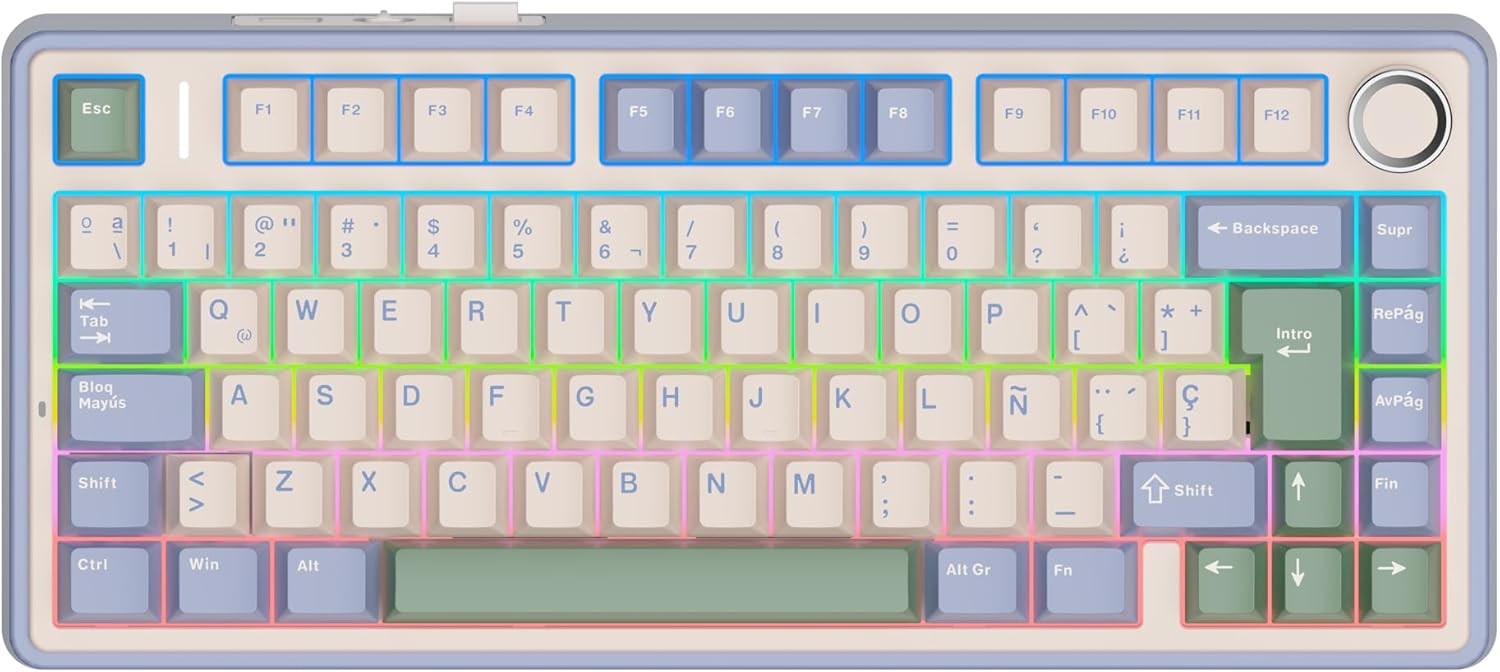
This is driving me insane. Please help!
That’s a compressed layout so print screen is missing.
And alt gr + [key] generally gives you the third symbol to the right on the key, behaves like a second shift for the number row, etc
Submitted 5 months ago by daggermoon@piefed.world to [deleted]
https://media.piefed.world/posts/PX/mV/PXmVttyJYkfo9EG.jpg
This is driving me insane. Please help!
That’s a compressed layout so print screen is missing.
And alt gr + [key] generally gives you the third symbol to the right on the key, behaves like a second shift for the number row, etc
That’s a weird layout, it doesn’t seem a proper Spanish (Spain) layout.
The apostrophe is the button right to the 0, but on the image it seems that is shift+?
The symbols on 1 are correct, but on 2 and 3 seems swapped, like for @ and # is shift+2/3 but in Spain it is AltGr+2/3
Isn’t it shift-? ?
Then it is most likely on the second layer via the Fn key, I’ve seen a couple use Fn-P but check your manual OP
Alt+gr is top right on key
That’s a mechanical keyboard, so you should be able to map the missing keys to wherever you like.
Failing that, PrtScr is probably on Fn+P, and apostrophes will be Alt Gr+{, Alt Gr+[ or Shift+?. The first two look like they may be accent dead keys, so try Shift+? first, or follow them with a space.
You hold the Function (FN) button and then the buttons you want.
Not familiar with that layout, but just looking at it I see there is a ' printed on the question mark key, to the right of zero. So try pressing that key in combination with shift, or if that doesn’t work, AltGr.
Print screen, I suspect you’ll have to look up in that specific keyboard’s manual. On a full size keyboard that doesn’t need an Fn key it would certainly be where it is in all other languages. I suspect it is hidden behind a combination with the Fn key but since it isn’t printed on there, I can’t tell for sure.
Alternative to print screen is to use whatever screen shot tool is built into your OS (Screenshot on Mac & most sane Linux distros, Snipping Tool on Windows)
That keyboard should come with a manual. Doesn’t it say what do you have to press?
What’s the thing on the upper right corner of the key with number 3? Could it be the apostrophe? Try AltGr+3 and see what happens. Or maybe it’s Meta+3? Meta is the key between left Ctrl and left Alt. You can also try AltGr+Shift+3.
Above the 3 is the punto medio. Its not used in Spanish, but like the ç next to the enter key is it used in Catalán.
Power toys and remap it?
I’m using Linux. I know I can remap it but surely there has to be a more proper way. I would think, anyway.
You can just set the layout to US (or whatever you’re accustomed to) and go by memory. 3 keys are different between ISO and ANSI, most characters are where your fingers expect them to be
This is what you want - github.com/sezanzeb/input-remapper/
No need to mess about with modifying the layout, just use the AltGr key as I wrote about earlier.

stoy@lemmy.zip 5 months ago
Use the AltGr key!
AltGr is a key on ISO keyboard, it means Alternative Graphic, and when you hold it And press either [ or { you should get the correct glyph.
Note that you won’t see it at first, it waits for the next character and will modify it to include the change, or insert it in front of the next character if the character does not use modifiers.
You can press space after triggering the glyph to just print it separately.
qualia@lemmy.world 5 months ago
Useless info: The backtick (`), forward tick (´), and apostrophe (') are distinct characters.
BillyClark@piefed.social 5 months ago
You’re a distinct character.
ChaoticNeutralCzech@feddit.org 5 months ago
T́h́é fóŕẃáŕd́ t́íćḱ íś áćt́úáĺĺý ćáĺĺéd́ áćút́é àǹd̀ t̀h̀è b̀àc̀k̀t̀ìc̀k̀ ìs̀ à g̀r̀àv̀è
stoy@lemmy.zip 5 months ago
I don’t have the energy to set one up, or to moderate one, but there should be a community called “GeneralInterestClub” or similar, where interesting but not really super useful info like this would be reposted.
banause@feddit.org 5 months ago
YSK: If you set keyboard layouts to thier versiones suffixed with “no dead keys” they don’t do that. Instead the character ist rendered immediately.
Lehmuusa@nord.pub 5 months ago
And then you don’t have dead keys.
You press `, then you press e. You get è without needing a specific key for that. The standard Finnish keyboard can do at least the following: ãẽĩõũṏñṽēūȳīōāḡȫǟǖŵêŷûîôâŝĝĥĵẑĉẇėṙṫẏıȯṗȧṡḋḟġḣȷŀżẋċḃṅṁẉẹṛṭỵụịọạṣḍ̣ḥḳḷẓ̣ṿḅṇṃțșȩŗţşḑģḩķļçņẃéŕýúíóṕáśǵj́ḱĺźćǘńḿẁèỳùìòàǜǹm̀ěřťǔǐǒǎšďǧȟǰǩľžčǚň
If I disable deadkeys, I lose all those characters. Many people on this planet have names that require those, and it’s a bit stupid not having them. Pressing space every now and then is not that much of work :)
Oh, and indeed: On the Finnish keyboard ~ is a deadkey. You get it by pressing the “^~ key together with AltGr, then pressing Space.
stoy@lemmy.zip 5 months ago
Interesting!
I have wondered about that!
daggermoon@piefed.world 5 months ago
Thank you! I will give it a try. Hitting the key than spacebar works in Firefox and Signal but not much else.
TrickDacy@lemmy.world 5 months ago
Than… Do you mean then?
Lehmuusa@nord.pub 5 months ago
Where does it not?!